AWS S3 HomeLab Part 5: Cross-Origin Resource Sharing
Your static site loads JS from S3. The browser blocks it. CORS is the handshake that says “this is OK”.
CORS: Configuration
Your static site loads JS from S3. The browser blocks it. CORS is the handshake that says “this is OK”.
The Problem CORS Solves
Browsers enforce the same-origin policy: JavaScript running on https://mysite.com cannot make requests to https://my-bucket.s3.amazonaws.com/data.json. The browser blocks the request before it even reaches S3.
This is a browser security feature, not an S3 permission issue. S3 would happily serve the file. The browser won't let the JS read the response because the origins don't match.
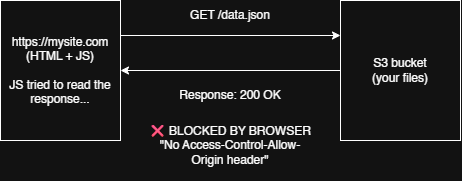
CORS (Cross-Origin Resource Sharing) is the mechanism that tells the browser: "Yes, this cross-origin request is allowed." It works through HTTP headers — the S3 bucket includes specific response headers that the browser checks before allowing JS to access the response.
Important: CORS is not an access control mechanism. It doesn't replace IAM policies or bucket policies. It only relaxes the browser's same-origin restrictions. curl, wget, and the AWS CLI don't enforce CORS at all.
How CORS Works — Preflight and Simple Requests
There are two types of cross-origin requests:
Simple Requests
GET, HEAD, and POST (with certain content types) are "simple." The browser sends the request directly and checks the response for CORS headers:
GET /photo.jpg HTTP/1.1
Host: my-bucket.s3.amazonaws.com
Origin: https://mysite.com

HTTP/1.1 200 OK
Access-Control-Allow-Origin: https://mysite.com    ← browser checks this
Content-Type: image/jpeg
Pre-flighted Requests
PUT, DELETE, custom headers, or non-simple content types trigger a preflight. The browser first sends an OPTIONS request asking "is this allowed?" before sending the actual request:
OPTIONS /data.json HTTP/1.1                ← browser asks first
Host: my-bucket.s3.amazonaws.com
Origin: https://mysite.com
Access-Control-Request-Method: PUT
Access-Control-Request-Headers: x-custom-header

HTTP/1.1 200 OK
Access-Control-Allow-Origin: https://mysite.com
Access-Control-Allow-Methods: GET, PUT, POST
Access-Control-Allow-Headers: x-custom-header
Access-Control-Max-Age: 3600               ← cache preflight for 1 hour

PUT /data.json HTTP/1.1                    ← then the actual request
...
CORS Headers — The Key Players
| Response header | What it does |
|---|---|
Access-Control-Allow-Origin | Which origin(s) can access the resource. * means any origin. Specific values like https://mysite.com are more secure. |
Access-Control-Allow-Methods | Which HTTP methods are allowed for cross-origin requests: GET, PUT, POST, DELETE, HEAD. |
Access-Control-Allow-Headers | Which request headers the browser may send. Common: Content-Type, Authorization, x-amz-*. |
Access-Control-Max-Age | How many seconds the browser can cache the preflight response. Reduces OPTIONS calls. |
Access-Control-Expose-Headers | Which response headers the browser's JS can read. By default, only Cache-Control, Content-Language, Content-Type, Expires, Last-Modified, Pragma are exposed. To read x-amz-meta-* or ETag from JS, expose them here. |
S3 CORS Configuration Format
S3 stores CORS rules as a JSON (or XML) document on the bucket. This is the JSON format used by put-bucket-cors:
{
  "CORSRules": [
    {
      "AllowedOrigins": ["https://mysite.com"],
      "AllowedMethods": ["GET", "PUT", "POST", "DELETE", "HEAD"],
      "AllowedHeaders": ["*"],
      "ExposeHeaders": ["ETag", "x-amz-meta-custom"],
      "MaxAgeSeconds": 3600
    }
  ]
}
Multiple rules are evaluated in order — the first matching rule's settings are used. AllowedHeaders: ["*"] permits any request header; specify a list to restrict them.
Common gotcha: S3 CORS is configured on the target bucket (the one receiving the request), not the origin bucket. If your static site on bucket A makes JS requests to bucket B, CORS goes on bucket B. If the static site is hosted on the same bucket (standard pattern), CORS goes on that bucket.
CORS Is Not Authentication
This is worth repeating. CORS headers only tell the browser "it's OK to read this response." They do not:
- Grant any permissions to access S3
- Authenticate the requester
- Control who can see the data (bucket policies do that)
- Apply to non-browser clients (curl, SDKs, CLI)
Think of CORS as a browser guardrail remover. IAM and bucket policies are the actual access gates. A properly secured bucket has both: IAM/bucket policy for access control, CORS for browser compatibility.
Debugging CORS — What Actually Failed?
When a cross-origin request fails, check in this order:
- Is it a CORS error or a 403? Open browser DevTools → Network tab. A CORS error shows a blocked request (red, with "CORS error" status). A 403 shows a server response with AccessDenied XML.
- Is the CORS config on the right bucket? It goes on the bucket receiving the request.
- Does AllowedOrigins include the exact origin?
https://mysite.comis not the same ashttp://mysite.comorhttps://mysite.com:8080. Protocols and ports matter. - Is AllowedMethods missing the method? Preflight checks the method — if your JS does a PUT but AllowedMethods only has GET, the preflight fails.
- Is AllowedHeaders missing a custom header? If your JS sends
x-api-keybut AllowedHeaders doesn't include it, preflight fails. - Is the bucket private? If the bucket requires authentication and the browser isn't sending credentials, add
AllowedOriginswith the specific origin (not*) —*doesn't work with credentialed requests.
Refer to this link for more reading about CORS: https://developer.mozilla.org/en-US/docs/Web/HTTP/Guides/CORS
Lab: Configure CORS, Then Test IT
Create a fresh bucket for this lesson. We'll configure CORS, then test with both curl (to see the raw headers) and a real browser (to see if the browser allows the request).
1. Create a bucket and upload a test JSON file
Let’s first create the bucket:
aws s3api create-bucket \
  --bucket learn-devops-cors-YOURNAME-0005 \
  --region ap-southeast-1 \
  --create-bucket-configuration LocationConstraint=ap-southeast-1

@'
{"message": "Hello from S3 CORS lab", "timestamp": "2026-07-26"}
'@ | Out-File -Encoding UTF8 data.json

aws s3 cp data.json s3://learn-devops-cors-YOURNAME-0005/ --content-type "application/json"
Now create a file called data.json and contains:
{"message": "Hello from S3 CORS lab", "timestamp": "2026-07-26"}Let’s upload the file:
aws s3 cp data.json s3://learn-devops-cors-YOURNAME-0005/ --content-type "application/json"Let’s update the PBA by disabling BlockPublicPolicy and RestrictPublicBuckets.
aws s3api put-public-access-block \
  --bucket learn-devops-cors-YOURNAME-0005 \
  --public-access-block-configuration \
  BlockPublicAcls=true,\
IgnorePublicAcls=true,\
BlockPublicPolicy=false,\
RestrictPublicBuckets=false
Let’s check if PBA has change using get-public-access-block
> aws s3api get-public-access-block --bucket learn-devops-cors-YOURNAME-0005
{
    "PublicAccessBlockConfiguration": {
        "BlockPublicAcls": true,
        "IgnorePublicAcls": true,
        "BlockPublicPolicy": false,
        "RestrictPublicBuckets": false
    }
}
We're relaxing BPA to allow a public-read policy — the bucket needs to serve data to browsers without credentials for this lab.
2. Make the bucket readable (public GetObject)
Let’s create a file called cors-bucket-policy.json. Where we are going to store our Bucket Policy to allow public read.
{
  "Version": "2012-10-17",
  "Statement": [
    {
      "Sid": "PublicRead",
      "Effect": "Allow",
      "Principal": "*",
      "Action": "s3:GetObject",
      "Resource": "arn:aws:s3:::learn-devops-cors-YOURNAME-0005/*"
    }
  ]
}
Now, let us update our bucket policy.
aws s3api put-bucket-policy \
  --bucket learn-devops-cors-YOURNAME-0005 \
  --policy file://cors-bucket-policy.json
Let us check if we have successfully applied the policy.
> aws s3api put-bucket-policy --bucket learn-devops-cors-vanpanugan-0005 --policy file://cors-bucket-policy.json
PS C:\Projects\learn-devops> aws s3api get-bucket-policy --bucket learn-devops-cors-vanpanugan-0005
{
    "Policy": "{\"Version\":\"2012-10-17\",\"Statement\":[{\"Sid\":\"PublicRead\",\"Effect\":\"Allow\",\"Principal\":\"*\",\"Action\":\"s3:GetObject\",\"Resource\":\"arn:aws:s3:::learn-devops-cors-vanpanugan-0005/*\"}]}"
}
3. Check current CORS configuration (should be empty)
aws s3api get-bucket-cors --bucket learn-devops-cors-YOURNAME-0005When we ran this code we got this output:
aws: [ERROR]: An error occurred (NoSuchCORSConfiguration) when calling the GetBucketCors operation: The CORS configuration does not existYou'll get a NoSuchCORSConfiguration error. CORS isn't configured by default — without it, browsers block cross-origin requests.
4. Add a CORS configuration — allow all origins (for testing)
Let’s now configure the CORS. We first have to create a cors-config.json, where we store our CORS config.
{
  "CORSRules": [
    {
      "AllowedOrigins": ["*"],
      "AllowedMethods": ["GET", "HEAD"],
      "AllowedHeaders": ["*"],
      "ExposeHeaders": ["ETag", "x-amz-request-id"],
      "MaxAgeSeconds": 3000
    }
  ]
}
Now let us upload the CORS config using put-bucket-cors.
aws s3api put-bucket-cors \
  --bucket learn-devops-cors-YOURNAME-0005 \
  --cors-configuration file://cors-config.json
Let us check if we have successfully configured the CORS.
> aws s3api get-bucket-cors --bucket learn-devops-cors-YOURNAME-0005
{
    "CORSRules": [
        {
            "AllowedHeaders": [
                "*"
            ],
            "AllowedMethods": [
                "GET",
                "HEAD"
            ],
            "AllowedOrigins": [
                "*"
            ],
            "ExposeHeaders": [
                "ETag",
                "x-amz-request-id"
            ],
            "MaxAgeSeconds": 3000
        }
    ]
}
5. Verify CORS is active — use curl to simulate a cross-origin request
curl doesn't enforce CORS, but we can send the Origin header to see what S3 returns:
curl -I -H "Origin: https://example.com" https://learn-devops-cors-YOURNAME-0005.s3.ap-southeast-1.amazonaws.com/data.jsonWe got this output when we ran the code:
HTTP/1.1 200 OK
x-amz-id-2: SNxwinyCAcxHHsIZ7z4wAte+mjbBzFJhPYkcpPGpI1KO3ohsZo2mrOLkCrXEP6+VlnjvLL6NOMGql5rpypImdpGM1L7dcvbp
x-amz-request-id: 625ZG1A86CGER5D5
Date: Mon, 27 Jul 2026 07:34:33 GMT
Access-Control-Allow-Origin: *
Access-Control-Allow-Methods: GET, HEAD
Access-Control-Expose-Headers: ETag, x-amz-request-id
Access-Control-Max-Age: 3000
Vary: Origin, Access-Control-Request-Headers, Access-Control-Request-Method
Last-Modified: Mon, 27 Jul 2026 07:17:51 GMT
ETag: "b6d6895188485636fb021a3bf130ea9d"
x-amz-server-side-encryption: AES256
Accept-Ranges: bytes
Content-Type: application/json
Content-Length: 64
Server: AmazonS3
Look for these response headers:
Access-Control-Allow-Origin: *Access-Control-Allow-Methods: GET, HEADAccess-Control-Expose-Headers: ETag, x-amz-request-id
These headers are S3's response to the browser saying "yes, this is a valid cross-origin request."
6. Test an OPTIONS preflight request
curl -X OPTIONS https://learn-devops-cors-YOURNAME-0005.s3.ap-southeast-1.amazonaws.com/data.json \
  -H "Origin: https://example.com" \
  -H "Access-Control-Request-Method: PUT" \
  -v 2>&1 | Select-String "Access-Control"
Running the command would get us:
> Access-Control-Request-Method: PUT
<Error><Code>AccessForbidden</Code><Message>CORSResponse: This CORS request is not allowed. This is
usually because the evalution of Origin, request method / Access-Control-Request-Method or
Access-Control-Request-Headers are not whitelisted by the resource's CORS spec.</Message><Method>PUT
</Method><ResourceType>OBJECT</ResourceType><RequestId>Q165RM4HDGMR34K0</RequestId><HostId>/59XYMTSq
faLbPpo4vSgjoO68wmGM9IDZ8w+DtsFoX3GqgBZqCZX3YnJtIjbAWv9xcSkq8p8rN2PrTxsRdZnWlp4nMUk3wtW</HostId></Er
ror>
The response should not include Access-Control-Allow-Methods: PUT — our CORS config only allows GET and HEAD. A browser would block a cross-origin PUT.
7. Update CORS to allow more methods — production-style config
Now lets update the CORS to allow more methods. Let’s first write a file called cors-config-v2.json to get allow more methods.
{
  "CORSRules": [
    {
      "AllowedOrigins": ["https://your-website-domain.example.com"],
      "AllowedMethods": ["GET", "PUT", "POST", "DELETE", "HEAD"],
      "AllowedHeaders": ["*"],
      "ExposeHeaders": ["ETag", "x-amz-request-id", "x-amz-meta-author"],
      "MaxAgeSeconds": 3600
    }
  ]
}
Then put it in our bucket CORS policy.
aws s3api put-bucket-cors \
  --bucket learn-devops-cors-YOURNAME-0005 \
  --cors-configuration file://cors-config-v2.json
Let’s double check if we have successfully updated the bucket CORS policy.
> aws s3api get-bucket-cors --bucket learn-devops-cors-vanpanugan-0005
{
    "CORSRules": [
        {
            "AllowedHeaders": [
                "*"
            ],
            "AllowedMethods": [
                "GET",
                "PUT",
                "POST",
                "DELETE",
                "HEAD"
            ],
            "AllowedOrigins": [
                "https://your-website-domain.example.com"
            ],
            "ExposeHeaders": [
                "ETag",
                "x-amz-request-id",
                "x-amz-meta-author"
            ],
            "MaxAgeSeconds": 3600
        }
    ]
}
This is closer to what a real production static site would use. In production, replace https://your-website-domain.example.com with your actual domain. Since that I am running the html locally. I change it to http://localhost:8000
8. Real browser test — create local HTML file
Now, let us test it using a HTML file. Create a file called cors-test.html and paste this code.
<!DOCTYPE html>
<html>
<head><meta charset="UTF-8"><title>CORS Test</title></head>
<body>
<h1>CORS Test</h1>
<pre id="output">Loading...</pre>
<script>
fetch("https://learn-devops-cors-YOURNAME-0005.s3.ap-southeast-1.amazonaws.com/data.json")
  .then(r => r.json())
  .then(d => document.getElementById("output").textContent = JSON.stringify(d, null, 2))
  .catch(e => document.getElementById("output").textContent = "Error: " + e.message);
</script>
</body>
</html>
We then run it using python using this command python -m http.server 8000. We will then get this output:
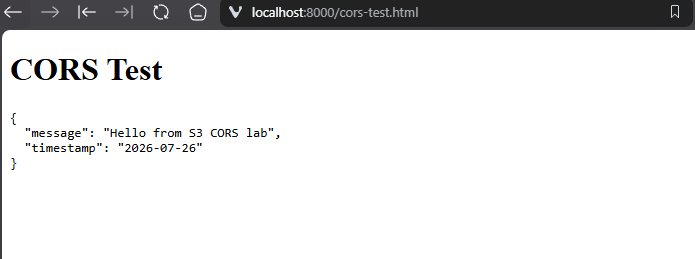
If does not work it will simply display Error: Failed to fetch. Double check your CORS Policy if that is the case.
9. List the CORS configuration (audit)
aws s3api get-bucket-cors --bucket learn-devops-cors-YOURNAME-0005You can validate your CORS rules at any time with this command.
10. Remove the CORS configuration (when done)
aws s3api delete-bucket-cors --bucket learn-devops-cors-YOURNAME-0005CORS is reversible — unlike versioning, you can delete the configuration entirely
Mission connection: When you deploy your static website, it will almost certainly make cross-origin requests — loading JSON data, calling APIs, fetching images from other S3 buckets. CORS is the configuration that makes those requests work in a browser. Without it, your site will look broken and the console will be full of red CORS errors.
Primary Sources
- S3 User Guide — Using cross-origin resource sharing (CORS)
- S3 User Guide — Configuring CORS (includes full request/response examples)
- MDN — Cross-Origin Resource Sharing (CORS) (browser-side perspective, excellent for debugging)