AWS S3 HomeLab Part 2: IAM and Bucket Policy
Creating buckets, Uploading Files, and Deleting them.
The Two-Layer Access Model
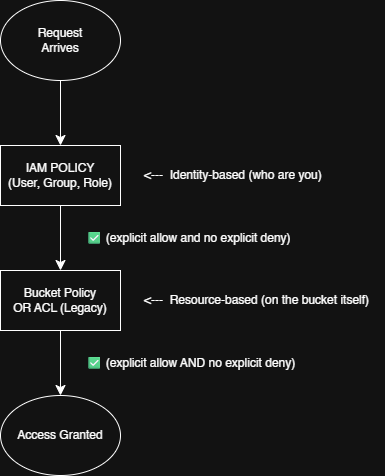
S3 access is governed by two independent systems. Both must permit the request, or access is denied. Think of them as two gates in series:
| IAM Policy | Bucket Policy | |
|---|---|---|
| Attached to | IAM principal (user, group, role) | S3 bucket |
| Scope | Per-identity — controls what that user can do | Per-bucket — controls who can access this bucket |
| Use case | Grant your developers S3 access | Make a bucket public; grant cross-account access |
| Has a Principal? | No — implied by who the policy is attached to | Yes — must specify "Principal" |
| Max size | 20 KB (managed policies), 10 KB (inline) | 20 KB |
The golden rule: access is denied by default. You need an explicit Allow in at least one policy AND no explicit Deny anywhere. A single Deny in either layer trumps everything.
Bucket Policy Anatomy
A bucket policy is a JSON document. Here are the essential elements.
{
  "Version": "2012-10-17",          ← Required. Always this date.
  "Id": "MyPolicy",                 ← Optional label
  "Statement": [                    ← Array of policy statements
    {
      "Sid": "AllowPublicRead",     ← Optional statement ID
      "Effect": "Allow",            ← Allow or Deny
      "Principal": "*",             ← Who this applies to
      "Action": "s3:GetObject",     ← What operation
      "Resource": "arn:aws:s3:::bucket-name/*"   ← Which objects
    }
  ]
}
Let’s discuss each field in details:
EFFECT
"Allow" or "Deny" . Deny always wins if there’s a conflict.
PRINCIPAL
Who gets the permission. Can be "*" (everyone), an AWS account ARN, an IAM role ARN, or canonical user ID. This is what separates bucket policies from IAM policies.
ACTION
The S3 API operation. Common ones: s3:GetObject , s3:PutObject , s3:DeleteObject , s3:ListObject , You can use wildcards: s3:Get* or s3:* .
RESOURCES
The ARN of the bucket and/or objects. Two forms:
arn:aws:s3:::bucket-name— the bucket itself (forListBucket,GetBucketLocation)arn:aws:s3:::bucket-name— objects inside (forGetObject,PutObject)
Critical detail: ListBucket is a bucket-level action, GetObject is object-level. You need both in separate statements to make a public listing work.
CONDITION (OPTIONAL)
Constrain when the policy applies — e.g., require HTTPS (aws:SecureTransport), restrict by IP (aws:SourceIP), or require a specific ACL.
It is best to practice The Principle of Least Privilege (PoLP) for creating bucket policies to protect against data exfiltration, automated ransomware, and lateral infrastructure takeover.
For more reading: Blog: IAM Policies and Bucket Policies and ACLs! Prepare for least-privilege permissions
Block Public Access (BPA)
Even if you write a bucket policy that grants "Principle": "*" access can still be blocked. Enter BPA — four override settings at the bucket level (and account level):
- BlockPublicAcls — ignore any public ACLs on objects
- IgnorePublicAcls — ignore any public ACLs on the bucket
- BlockPublicPolicy — reject any bucket policy that grants public access
- RestrictPublicBuckets — limit public access to only your own AWS account (blocks cross-account public access even if a policy allows it)
All new buckets have all four BPA settings ON by default. If you followed the lab in the previous lesson and tried to access your object in a browser, you get a 403 — even though no policy explicitly denies. BPA is the reason.
For more reading: Amazon S3 Block Public Access
To host a public static website, you must turn off BPA settings that block public bucket policies. There’s no way around it — and that’s intentional. AWS wants you to be very deliberate about making things public.
Lab: Make It Public, Lock It Down
Creating a bucket
In this part, we will be creating a new bucket.
aws s3api create-bucket --bucket learn-devops-vanpanugan-0002 --region ap-southeast-1 --create-bucket-configuration LocationConstraint=ap-southeast-1Running this command we can now have a new new bucket called learn-devops-vanpanugan-0002.

Upload a test file for the web
Now let us upload a test file. We will create a index.html file and upload it to the learn-devops-vanpanugan-0002 bucket.
"Hello from S3 static site!" | Out-File -Encoding UTF8 index.html
aws s3 cp index.html s3://learn-devops-YOURNAME-0002/ --content-type "text/html"
The --content-type flag is essential — browsers won’t render HTML without it.
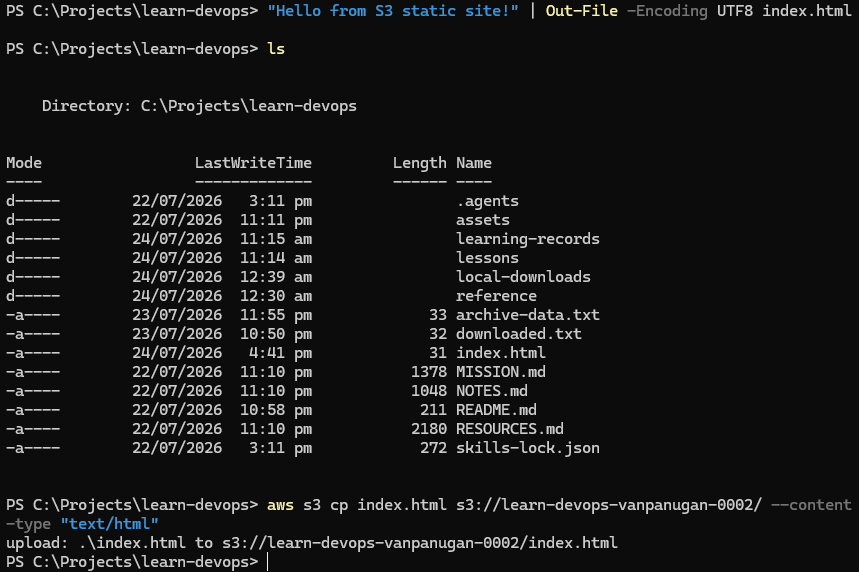
We now have successfully created and uploaded the index.html to the bucket. Now we will try accessing it.
Reference: https://docs.aws.amazon.com/cli/latest/reference/s3/cp.html
Try accessing it via browser (expect failure)
We will now try accessing the index.html.
curl https://learn-devops-YOURNAME-0002.s3.ap-southeast-1.amazonaws.com/index.htmlRunning the command show’s us this output.
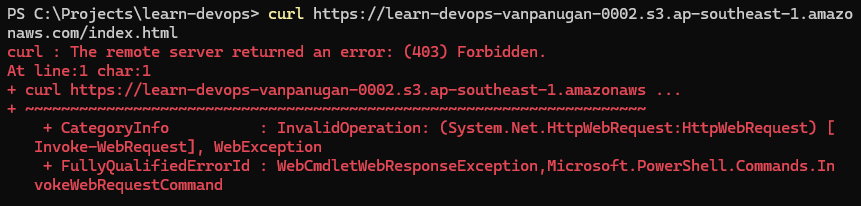
We get an AccessDenied XML response. Your object exists, but Block Public Access is blocking it.
Check current Block Public Access settings
To access the index.html, we have to check Block Public Access settings. By using this command:
aws s3api get-public-access-block --bucket learn-devops-YOURNAME-0002Let us dissect the command:
get-public-access-block: The specific API operation being called. It checks the S3 Public Access Block feature for the target bucket to see which safeguards are currently turned on.--bucket: The parameter flag indicating that the next word is the target S3 bucket’s name.
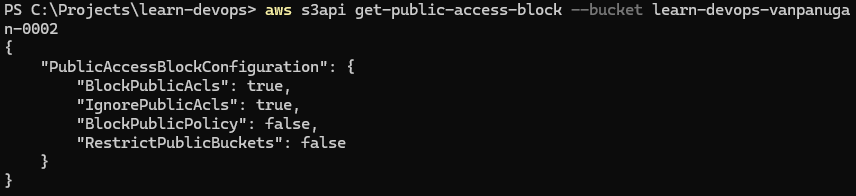
By using the command, we got this output:
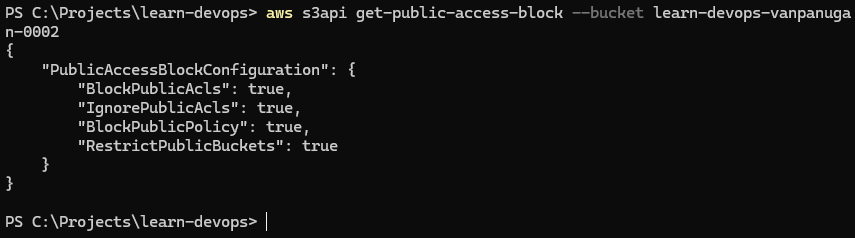
Now, we know that the Public Access Block Settings are turned on. So we have to turn it off.
Disable BPA for public policies only
We are turning off exactly one BPA settings — the one that blocks public bucket policies. The other three stay on.
aws s3api put-public-access-block \
  --bucket learn-devops-YOURNAME-0001 \
  --public-access-block-configuration \
  BlockPublicAcls=true,\
IgnorePublicAcls=true,\
BlockPublicPolicy=false,\
RestrictPublicBuckets=false
Let us dissect the command:
put-public-access-block: The specific API operation being called. Unlikeget-public-access-block(which reads the settings),put-public-access-blockcreates or overwrites the security rules on the bucket.-bucket learn-devops-YOURNAME-0001: Specifies the target S3 bucket by its globally unique name.-public-access-block-configuration: The parameter flag that accepts the actual security settings. In this command, the values are being passed using AWS CLI shorthand syntax (key-value pairs separated by commas without spaces) rather than a JSON string.
Flags:
BlockPublicAcls=true: Prevents users from uploading new objects with public Access Control Lists (ACLs) or modifying existing objects to make them public via ACLs.IgnorePublicAcls=true: Tells AWS to completely ignore any public ACLs that might already exist on the bucket or any of its objects. Even if an older object has a "public read" ACL attached, this setting renders it inactive.BlockPublicPolicy=false: Permits users with the right IAM permissions to attach bucket policies that would normally grant public internet access (e.g., allowing anyone to read files). Setting this tofalseremoves the guardrail that stops public bucket policies from being saved.RestrictPublicBuckets=false: Acts as a second layer of defense. Even thoughBlockPublicPolicy=falseallows a public policy to be attached to the bucket, this setting restricts the actual access so that only AWS service principals and internal AWS account identities can reach the bucket. Anonymous internet traffic remains blocked.
By running the command and check the BPA, We got this output.
Add a public-read bucket policy
We now are able to change the BPA, let us now add a public-read bucket policy to it. Let us first create a public-policy.json to store or bucket policy.
{
  "Version": "2012-10-17",
  "Statement": [
    {
      "Sid": "PublicReadForWebsite",
      "Effect": "Allow",
      "Principal": "*",
      "Action": "s3:GetObject",
      "Resource": "arn:aws:s3:::learn-devops-YOURNAME-0001/*"
    }
  ]
}
Let us dissect the public-policy.json:
"Version": "2012-10-17": Specifies the AWS IAM policy language version.2012-10-17is the current syntax version required by AWS to evaluate modern IAM rules. (Note: This is a fixed date identifier, not the date you created the policy)."Statement": [...]: A container array that holds one or more individual permission rules. This policy contains a single rule."Sid": "PublicReadForWebsite": The Statement ID. This is an optional, developer-friendly label used to identify the purpose of the statement. Here, it clearly documents that the rule is for website hosting."Effect": "Allow": Indicates the result when the rule is triggered. Policies can either be"Allow"or"Deny". This explicitly opens up access."Principal": "*": Specifies who receives this permission. The wildcard"*"means absolutely anyone, including anonymous users on the public internet who are not signed into an AWS account."Action": "s3:GetObject": The exact API operation being permitted.s3:GetObjectallows users to read, download, and view files (objects). It does not allow them to list all files in the bucket (s3:ListBucket), upload new files (s3:PutObject), or delete files (s3:DeleteObject)."Resource": "arn:aws:s3:::learn-devops-YOURNAME-0001/*": The Amazon Resource Name (ARN) defining the exact target of the permission. The/*at the very end is critical—it means the rule applies to all objects inside the bucket, rather than the bucket itself.
We now have to create a file for it. So let us now add this to our bucket by using this command:
aws s3api put-bucket-policy \
  --bucket learn-devops-YOURNAME-0001 \
  --policy file://public-policy.json
Verify public access works now
Let us now verify if we did things right by using curl
curl https://learn-devops-YOURNAME-0001.s3.ap-southeast-1.amazonaws.com/index.htmlWe got this output:

Scenario: Lock it down (backup bucket)
Now reverse it. Your backup bucket should not be public. Delete the public policy and re-enable full BPA:
First let us delete the bucket policy:
aws s3api delete-bucket-policy --bucket learn-devops-vanpanugan-0002We got this output:

Next, we reverse the Public Block Access:
aws s3api put-public-access-block --bucket learn-devops-vanpanugan-0002 --public-access-block-configuration BlockPublicPolicy=true,RestrictPublicBuckets=true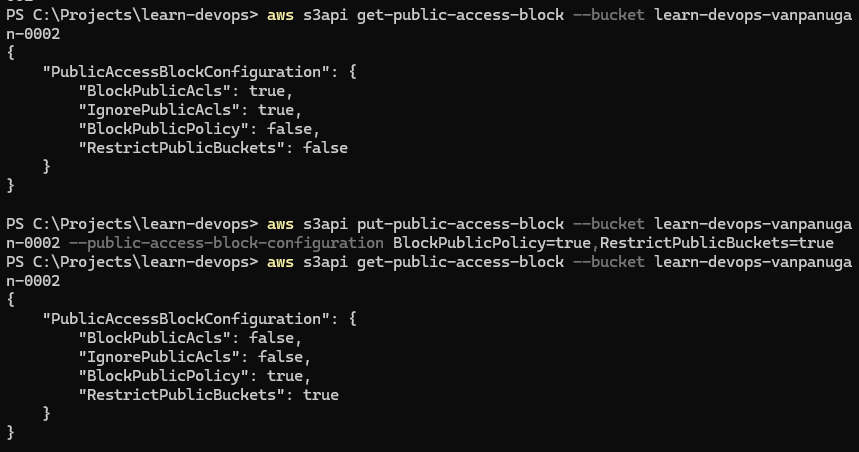
Verify it’s locked again
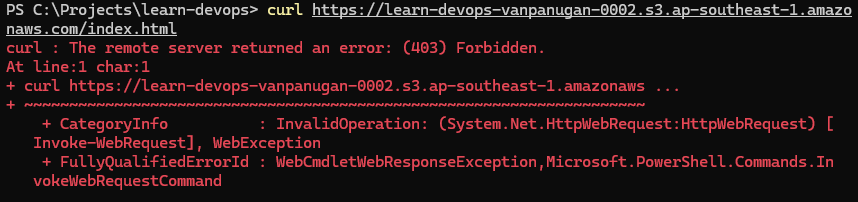
Let’s run this command to see if we cannot access it anymore.
curl https://learn-devops-YOURNAME-0001.s3.ap-southeast-1.amazonaws.com/index.htmlHere is the output:
Clean up
Let’s delete the bucket
aws s3 rm s3://learn-devops-vanpanugan-0002 --recursive
aws s3 rb s3://learn-devops-vanpanugan-0002
This is the output:

Mission connection: Step 5 is exactly what you’ll do to host your static site. Step 8 is the default state for your backup bucket. You just toggled between both worlds in under 10 minutes.
Condition Keys Worth Knowing
Bucket policy conditions make policies smart. Here are three you'll use:
| Condition | What it does | Example value |
|---|---|---|
aws:SecureTransport | Require HTTPS — deny any HTTP request | "false" (deny if NOT secure) |
s3:x-amz-server-side-encryption | Require a specific encryption type on upload | "AES256" or "aws:kms" |
s3:signatureversion | Require SigV4 (block older signing protocols) | "AWS4-HMAC-SHA256" |
Example: a policy that allows uploads but only over HTTPS and only with server-side encryption:
{
  "Effect": "Deny",
  "Principal": "*",
  "Action": "s3:PutObject",
  "Resource": "arn:aws:s3:::backup-bucket/*",
  "Condition": {
    "Bool": { "aws:SecureTransport": "false" }
  }
}
This doesn't grant access — it denies any insecure upload. Pair it with an Allow statement for your IAM role, and you've enforced encryption in transit.
In the next lesson, we will be tackling Versioning & Lifecycle Policies.